
Operations
The paperwork nobody wants to do.
Shift reports, inspections, non-conformities, errands. What today lives in a notebook, a spreadsheet and three WhatsApp groups. Here it is filled in once, where the work happens, and it stays attached to the machine, the person and the date.
Forms
The record the standard asks for
Reports
What is seen on the floor, told in time
Tasks
The work that needs no wrench
Production
What you make deducts its material
Production plan
What to buy, and by when
Forms
The record the standard asks for, already written.
Every form carries the clause of the standard it covers, its version, whether it is active and which site it belongs to. It is filled in from the phone or the desktop, and the entry is signed and dated. When the audit arrives there is nothing to reconstruct: it is already there.
- With the clause of the standard on it
- Versioned and with a status
- You decide if it shows on mobile
- Tags and its own site

Internal Quality Audit
ISO 9001 §9.2 +27- CategoryQuality
- Version1.0
- StatusActive
- On mobileYes
- Tagsinternal audit · ISO 9001 · QMS
- SiteBarcelona plant
You do not start from a blank page.
During onboarding we load the templates for your sector, across several categories and already tied to the clause of the standard they cover. The ones for a fishing fleet look nothing like the ones for an industrial plant, and that is the whole point: nobody wants to bend a generic form into the work they actually do. From there you edit them, duplicate them, or build your own.
One example from each category
- QualityInternal Quality Audit
- HSEHigh-Risk Work Permit
- EnvironmentIndustrial Waste Log
- LogisticsSupplier Assessment
- PeopleHours of Work and Rest Record
- OperationsNavigation Watch Report
Your products, your lines, your defects.
A generic form makes you type the product name by hand every time, and then no count ever adds up. With lists, each customer builds their own catalogues and plugs them into whichever forms they want as a dropdown field. The operator picks, does not type. And because everyone picks from the same list, the data can finally be added up.
- Catalogues owned by each customer
- Plugged in as a form field
- The operator picks, does not type
- The counts finally add up
Customer lists
- Products34 items
- Production lines6 items
- Defect types18 items
Form field
And if one is missing, you build it.
The builder is drag and drop, with 21 field types. The obvious ones are there, and so are the ones a shop floor actually needs: on-screen signature, attached photo, phone coordinates, automatic average of several numbers, and a field that pulls data already in FluX so the operator picks the asset or the part instead of writing it out.
It is organised in sections, any field can be made mandatory, and some fields only appear if you answered something else first, so nobody hands the operator forty questions that do not apply. And before publishing you mark which clause of which standard it counts towards: that is what feeds the Compliance Center.
- Drag and drop, in sections
- Signature, photo and GPS
- Fields that appear only when needed
- You mark the standard it covers
Reports
What is seen on the floor, told before it is forgotten.
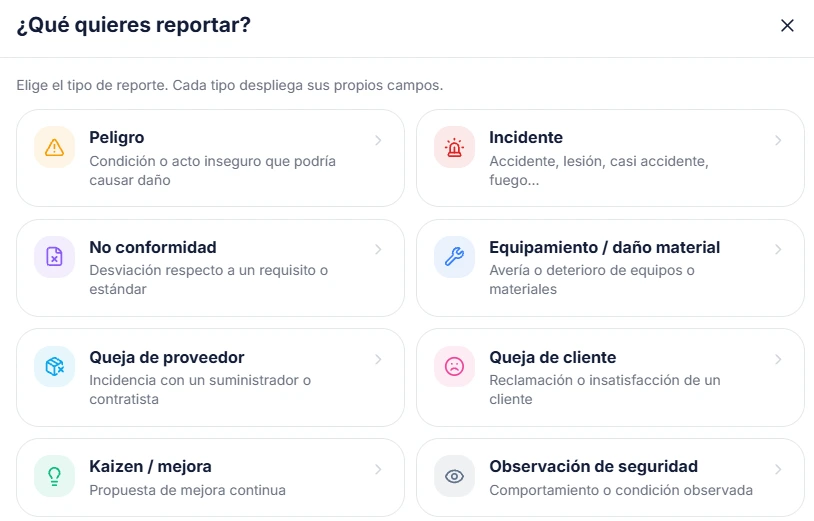
Whoever sees the problem is the one standing in front of it, and that is almost never the one with the computer. From the phone they choose what they are reporting and the form changes on its own: an incident asks for outcome and form of contact, a non-conformity asks which requirement was missed. With a photo, and with the cost impact when it has one.
- Eight types, each with its own fields
- Raised from the phone, with a photo
- With cost impact
- Turns into a work order
Why this matters more than it looks
No friction, so it gets reported
If telling someone about a near miss means filling in a paper form and walking up to the office, it does not get told. And what does not get told does not get fixed. Three taps on a phone changes that.
Each type asks its own questions
An incident and a customer complaint do not share fields. Separating them means each one collects what its standard asks for, and the data comes out classified instead of as free text nobody can count.
It can be put in euros
A report with a cost impact stops being a complaint and becomes an argument. That is what turns "that machine needs fixing" into a management decision.
It does not die in an inbox
A report becomes a work order with an owner and a date. The loop closes where it started, and the history stays attached to the asset.
Tasks
Not a breakdown, but it still has to get done.
Not everything that needs doing involves a wrench. Renewing a certificate, preparing for the auditor's visit, ordering gloves, checking the first aid kit. These are the things that get forgotten because they do not fit anywhere. Here they have their place, with an owner and a date, and they show up in the "My day" of whoever has to do them.
- One-off or recurring
- With an owner and a date
- They show up in mobile "My day"
- Any role can create them
Tasks
AllRecurringRenew calibration certificate
Marta · Due in 4 days
Prepare the auditor's visit
Carlos · 12 September
- Recurring
Check the plant first aid kit
Antonio · Every month
Order size L gloves
Unassigned · No date
Production
What leaves the door deducts what it used.
Until now your store moved with what comes in and with what a work order closes. Neither of those touches raw material, so the spare a mechanic uses went down, while the resin, the preforms and the labels kept whatever number somebody typed on day one.
Every product carries its recipe: what one unit consumes and how much. At the end of the shift somebody declares what came out, and the material goes down on its own. Nothing to write twice and nothing to reconcile at month end.
- Rejects consume material too
- Recipes with real decimals
- A record is voided, never deleted
- Every movement leaves its trace
500 ml PET bottle
Morning shift · Zaragoza plant
Good
1,000
Rejected
12
Scrap
1.19 %
Deducted from the store
- PET preform 28 g1,012 u
- 28 mm screw cap1,012 u
- Thermal label1,012 u
Runs out first: 28 mm screw cap
Example data
The details you notice a month later
The bad piece already ate its material
If a thousand come out good and twelve bad, the store paid for a thousand and twelve. Both are deducted, and kept apart so you can look at scrap. Deducting only the good ones is how a spreadsheet balances, not how a plant works.
Changing the recipe does not rewrite the past
What was consumed is frozen into the record, with the stock before and after. If the recipe changes tomorrow, yesterday still says what actually happened yesterday.
It is voided, and it gives back what it took
A production record is not edited: it is voided. And when it is, it returns exactly the material it consumed, not the stock that was there before. Other movements may have happened in between, and overwriting them would be inventing stock.
And the plant next door is untouched
A product belongs to one plant, and its recipe can only draw material from that one. Producing in one never empties the store of another, and the system will not let you build a recipe that would.
Production plan
Tell me what you are going to make and I will tell you what you are short of.
A factory shopping list usually comes from eyeballing a spreadsheet: somebody multiplies quantities by the recipe, subtracts what they think is in the store, and orders. The mistake does not show on the day you order. It shows weeks later, with the mould mounted and one component still missing.
You tell it what you plan to make over the coming months. FluX crosses that with the recipe of every product, with the stock of that plant, with what is already ordered and not yet received, and with the scrap rate measured by your own shift reports. It gives back what to buy, how much, and the day by which it has to be ordered. And it exports to Excel or PDF for whoever has to approve it.
It does not guess your demand: it calculates on the plan you give it. And it does not order on its own: the list becomes a purchase request in Purchasing, when somebody approves it.
- Subtracts what is already ordered
- Scrap comes from your own reports
- Tells you the day to order by
- Exports to Excel and PDF
First quarter plan
Bizkaia plant · 3 months
Stainless sheet 1.5 mm
kg- The plan needs2,400
- Real scrap, 2.3 %55
- In the store640
- Ordered, not received300
Order before 12 March
This supplier has no lead time on file: the date is not known
Example data
Why this list can be signed
It will not make you buy it twice
Run the list on the 1st and again on the 8th, and whatever is already approved and awaiting delivery is subtracted. It is the classic failure of these calculations, and the one that makes people stop trusting them by the second week.
The scrap rate is yours, not a round number
Rejects come from the history of shift reports for that product. If your trays run at 2.3 %, material is calculated for what is really consumed. And if a product has no history yet, it counts zero and the column says so, instead of slipping a reasonable-sounding 3 % into a purchase.
By what day, not just how much
«You are 2,347 short» leaves you the other half of the job by hand. The date comes from the first month the material is needed, minus the lead time of that supplier. And if the supplier has no lead time on file, the date is left empty and says so: it does not invent a fortnight.
Every number can be taken apart
The screen shows the whole sum: what the plan asks for, what rejects eat, what is in the store and what is on its way. A number you have to take on faith does not get argued with, it gets ignored, and whoever ignores it goes back to the spreadsheet.
Shall we bring your operation to the call?
Show us the sheet you fill in on paper today and we will build it in front of you. And if what you are after is the purchase plan, bring the spreadsheet it comes out of today and we will go through it with your recipes. It is the fastest way to see whether this fits how you work.